Baduk in Python
A downloadable game
Baduk made in Python
Baduk (Go) Singleplayer / Multiplayer Game in Python
Made as a project to keep my Python skills up-to-go as im learning python in school and im out doing LIA ( Learning in Work ), and we are not doing so much python programming ourselves.
Graphical User Interface: Click on the board to place stones instead of typing coordinates
Singleplayer Mode: Play against an AI opponent with three difficulty levels (Easy, Medium, Hard)
Local Multiplayer Mode: Play on the same computer against another human player
Network Multiplayer Mode: Play over the network with another player
- Host a game and share your IP:Port with another player
-Join a game by entering the host's IP:Port
-Real-time move synchronization
Multiple Board Sizes: Choose from 9x9, 13x13, or 19x19 boards
Full Game Rules:
-Stone placement and capture mechanics
-Liberty counting
-Ko rule enforcement
-Suicide prevention
-Area scoring with komi
Strategic AI: The AI uses multiple heuristics including capture detection, liberty counting, and positional evaluation
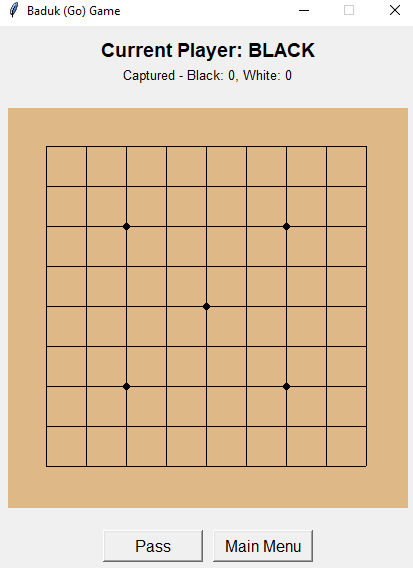
Visual Elements: Traditional Go board appearance with star points, clear stone rendering, and move highlighting
How to Use:
Singleplayer (vs AI)
1. Click "Singleplayer (vs AI)"
2. Select board size from the dialog (9x9, 13x13, or 19x19)
3. Choose AI difficulty (Easy, Medium, or Hard)
4. Click on intersections on the board to place your stones
5. Click "Pass" button to skip your turn
6. Click "Main Menu" to return to the main menu
7. Game ends when both players pass consecutively, showing final scores
Local Multiplayer
1. Click "Multiplayer (local)"
2. Select board size from the dialog
3. Take turns clicking on the board to place stones
4. Click "Pass" button to skip your turn
Network Multiplayer
To Host a Game:
1. Click "Network Multiplayer"
2. Click "Host Game"
3. Select board size from the dialog
4. Enter a port number (default: 5555)
5. The game will display your IP address and port (e.g., `192.168.1.100:5555`)
6. Click "Copy to Clipboard" to copy the connection information
7. Share this information with the other player
8. Wait for the other player to connect
9. Once connected, you play as Black and go first
Download
Click download now to get access to the following files:
Leave a comment
Log in with itch.io to leave a comment.